Customer expectations have changed. Today’s customers want fast, convenient, and personalized support and they want it 24/7. WhatsApp has quickly become the go-to platform for businesses because it’s where customers already spend their time.
But it’s not enough to “just be on WhatsApp.” To truly deliver fast and efficient customer support, businesses especially SMEs must embrace WhatsApp automation.
Whether you run an online store, a service-based business, or a growing startup, WhatsApp automation can reduce workload, boost customer satisfaction, and streamline operations. This guide explores how to optimize customer support using WhatsApp automation and why tools like LuliChat make the process seamless.
Why WhatsApp Automation Matters for Modern Customer Support
Automation isn’t just a trend, it’s a competitive advantage. Here’s why it’s essential:
1. Customers Expect Instant Responses
According to Zendesk’s Customer Experience Trends Report (2024), 69% of customers expect a response within minutes when they message a business on chat platforms.
Automation ensures:
No delays
No missed messages
Immediate acknowledgment
2. SME Teams Are Often Overwhelmed
Most Nigerian SMEs handle customer support manually via:
A single phone
Staff switching between apps
Delayed follow-ups
Automation dramatically improves efficiency by reducing manual work.
3. WhatsApp Is the Most Used Messaging Platform
Statista reports that WhatsApp has over 2.7 billion active users globally in 2025. For Africa, especially Nigeria, it remains the dominant communication tool.
That means your customers are already there, automation helps you meet them instantly.
Key Ways to Optimize Customer Support Using WhatsApp Automation
Below are practical strategies every SME can implement.
1. Automate First Responses and Capture Leads Instantly
Automated welcome messages allow you to:
Greet customers professionally
Capture their details
Direct them to the right department
Provide quick options
Example Automated Welcome Message: “Hi! 👋 Thanks for reaching out. How can we assist you today? 1️⃣ Track an order 2️⃣ Speak with support 3️⃣ Product inquiries”
Tools like LuliChat help you set this up in minutes.
2. Use Chatbots to Provide 24/7 Support
Chatbots can answer common questions like:
Pricing
Delivery timelines
Product availability
Working hours
How-to guides
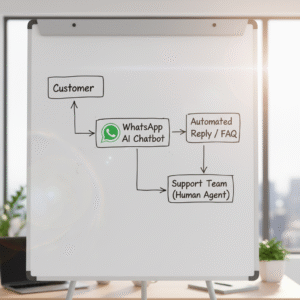
This saves agents time and reduces backlogs. For example, LuliChat’s AI bot instantly responds using your custom knowledge base—perfect for online stores, tech companies, and service brands.
3. Automatically Route Messages to the Right Team
Instead of sending all messages to one phone, automation allows you to route chats to:
Sales
Support
Billing
Technical help
This improves speed and reduces customer frustration.
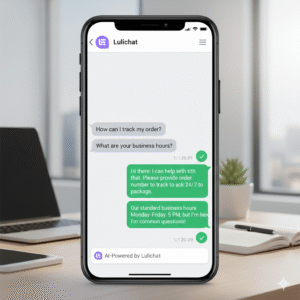
4. Automate Order Tracking & Status Updates
For e-commerce businesses, automation can send:
Order confirmations
Delivery updates
Payment reminders
Follow-up messages
Feedback requests
This creates a smooth customer journey without manual intervention.
5. Personalize Conversations with Customer Data
Automation tools can integrate with:
CRM
Website forms
Online stores
Ticketing systems
This allows you to automatically personalize messages using customer names, order details, or previous history.
Personalized messages improve customer trust and satisfaction.
6. Use WhatsApp Templates for Faster Responses
Templates ensure consistent and professional responses. SMEs can automate:
Appointment reminders
Payment confirmations
Failed delivery alerts
Renewal reminders
Pro tip: With LuliChat, you can auto-fill template variables like name, date, and product.
7. Integrate WhatsApp Automation with Your Website & Social Media
Add WhatsApp chat widgets to:
Your homepage
Product pages
Help center
Instagram bio
Facebook page
Google Business Profile
This ensures customers can reach you instantly.
8. Monitor Performance with Analytics
To optimize support, track:
Response time
Resolution time
Chat volume
Customer satisfaction
Platforms like LuliChat offer built-in analytics dashboards to guide your improvements.
Best Practices for Using WhatsApp Automation Effectively
1. Keep Messages Clear & Human
Don’t let automation feel robotic. Use a friendly, simple tone.
2. Don’t Over-Automate Everything
Use automation for repetitive tasks but let humans handle complex issues.
3. Use Quick Reply Buttons & Menus
Make navigation easier for users.
4. Comply with WhatsApp Business Policies
Always stay compliant to avoid restrictions.
5. Regularly Update Your Knowledge Base
Automation is only as smart as the content you feed it.
Why LuliChat Is the Best WhatsApp Automation Tool for SMEs
Here’s why businesses choose LuliChat:
Easy WhatsApp integration (setup in minutes)
Smart AI chatbot that answers customer FAQs
Unified inbox for teams
Auto-routing and auto-replies
Supports websites, Instagram, and WhatsApp
Affordable for Nigerian SMEs
WhatsApp automation is no longer optional. It is the fastest way for SMEs to improve customer experience, reduce workload, and deliver instant support. With tools like LuliChat, businesses can automate repetitive work while maintaining warm, personalized conversations that build trust.
SMEs that embrace WhatsApp automation today will gain a massive competitive advantage tomorrow.
Ready to automate your customer support and respond faster? Sign up for LuliChat today and transform the way your business communicates!
Victor Adeleye is a versatile professional with expertise in software development, content writing, and SEO. Passionate about crafting user-friendly digital solutions, he specializes in React, WordPress, and frontend development. With a keen eye for design and data-driven insights, Victor combines technical skills with creative problem-solving to deliver impactful results.